


Castle - Make and Play
4.72.74K Reviews
App Specs
- Version
- 282.0
- Updated On
- License
- Free
- Downloads
- 10,000,000+
- Developer
- Monterey's Coast, Inc.
- Categories
- Art & Design
- Platform
- Android, iOS
Screenshots
 Analysis by AppCompare
I’d approach Castle as a place to move between two roles: player and maker. When I have a few spare minutes, I can browse games other people have made; when one sparks an idea, I can try building something of my own and let others experience it. That loop is the app’s strongest appeal. It makes game creation feel less like a separate, technical hobby and more like something that can grow out of ordinary play.
That blend also sets expectations. Castle is an art and design app with a social, game-making focus, not a conventional library of polished commercial games or a full professional development suite. I’d recommend it to curious players who want to experiment, and to beginners who enjoy learning by making small things. If you mainly want a finished, carefully curated game experience, or need deep control over a large production, a dedicated game or development tool may suit you better.
From a spare moment to a first creation
A realistic way to start is during a quiet break: open the app, try a few community creations, and pay attention to one small detail that makes a game enjoyable. Maybe it is a clear objective, an amusing surprise, or a simple interaction that invites another attempt. Rather than planning a huge project immediately, I’d use that observation as the seed for a small experiment. Keeping the first idea modest makes it easier to finish and gives you something concrete to share.
The useful question is not whether your first result can compete with an established game. It is whether someone else can understand what you made and enjoy trying it. Treating the first build as a playable sketch takes pressure off and helps you learn the app’s creative rhythm. If you discover that you like shaping rules and experiences, you can gradually make your ideas more ambitious.
Making the handoff from playing to sharing
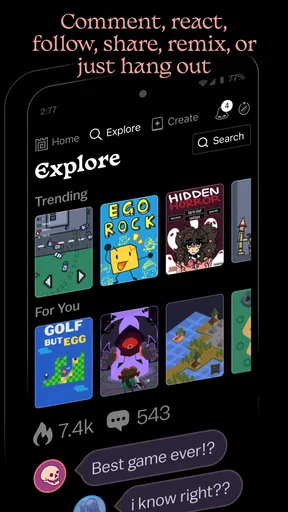
The social side matters most when you use it as a feedback loop rather than a popularity contest. Following creators whose work interests you can give you a steady source of inspiration, while comments can help you see how other people respond to your own experiments. I’d share a creation with a clear idea of what I want to learn from the response: whether the goal makes sense, whether a moment feels fun, or what a player expects to happen next.
That handoff has a trade-off. Community feedback can encourage you to keep going, but reactions are not the same as a structured critique or a development plan. If you want to improve, look for specific observations and compare them with what you intended. A vague response may still show that someone noticed your work, but it may not tell you what to change. For more deliberate collaboration, agree on a small task or question before inviting another person into a project.
How Castle fits beside other choices
Compared with ordinary social platforms, Castle gives creative work a more active destination: people can encounter a game, not just a post about one. Compared with a dedicated game engine, it is positioned around approachable creation and community discovery rather than the demands of a professional production pipeline. That makes it a more inviting first step for someone who wants to see whether making games is enjoyable, though it is not the choice I’d make for a project that depends on extensive technical control.
Worth Reading Before You Choose

EA SPORTS FC Mobile 26 Is a Bigger Football Game, but It Takes Time

Flipboard Shows What News Apps Must Do Beyond the Feed

Switching to Android Auto Means Rethinking Your Driving Routine

Google Calendar Makes a Crowded Week Easier to Manage

Ludo King Makes the Most of the Minutes Between Plans

Baby Panda World Brings Quick Play to Modern Phones, but Its Game Library Feels Busy
It also differs from simply browsing a conventional game catalog. The range of user-created work can make discovery feel personal and surprising, but consistency is harder to expect when creations come from many people with different levels of experience. I’d use Castle when I want variety and the chance to make something myself; I’d choose a curated game store when I want a predictable level of polish or a particular genre delivered in a finished package.
Practical expectations before you settle in
Castle is free to get started with, while optional in-app purchases range from $0.99 to $9.99 per item. I’d begin by exploring the free experience and only consider a purchase if I understand what it adds to the way I create or play. That keeps the decision tied to a real need instead of making a purchase just because it is available. The app is rated Teen, so it is sensible for families to consider that age guidance when deciding who should use its social and user-created environment.
Its audience is substantial: it has more than 10 million installs, with an average rating of 4.6 from around 138,000 ratings. Monterey's Coast, Inc. develops the app, which was released on February 16, 2021, and its current version is 265.0. Those details help place it as an established creative community, but they do not remove the need to judge individual creations for yourself. The range of quality is part of the format, so browsing with a little patience is more rewarding than expecting every game to land.
Where the workflow can break
The main friction is the gap between an appealing idea and a satisfying playable result. A tool can make starting feel accessible, but turning a rough concept into something clear still takes choices and revision. I’d avoid treating the presence of templates or components as a promise that every project will come together automatically. Start with one interaction, test whether it communicates what you meant, and only then add more. That order helps keep experimentation enjoyable instead of turning it into a sprawling project.
Discovery can also take time. Because the experience depends on creations from other users, a session may include work that feels rough or simply is not to your taste. If that happens, it is not necessarily a reason to leave; it may be a cue to follow creators whose ideas suit you and to make your own contribution. Still, someone who dislikes browsing through uneven content may be happier with a curated catalog.
I’d also keep expectations realistic about what community participation can provide. Following, commenting, and collaborating can make the process feel shared, but they do not guarantee that every project will receive useful feedback or find an audience. For a personal experiment, that may be fine: the value can come from making and learning. If your goal is formal instruction, a structured course or a tool with guided lessons is likely a better companion.
If you are wondering whether you can enjoy Castle without building, the answer is yes: exploring other people’s games is part of the appeal. If you are wondering whether it is a sensible place to begin making games, I think it is, provided you approach it as a low-pressure creative outlet rather than a shortcut to professional development. And if you want to collaborate, it helps to bring a specific idea or question instead of expecting the social features alone to organize a project.
For anyone on an older device, the stated minimum operating-system requirement is version 7.0, so checking compatibility before installing is a practical first step. The current version is 265.0, and the app remains free to try, with optional purchases to weigh separately. Those basics make it easy to decide whether it is worth a look, while the best test is still whether you enjoy moving between browsing, making, and sharing.
If you’re an avid gamer who loves crafting your own virtual universe, then Castle - Make and Play could be your next obsession. This intriguing app is a playground for creativity, letting you build, share, and explore games and worlds created by users all around the globe. So, if you're curious about what this app has to offer, grab a comfy seat, and let's dive into the details.
Unleashing Your Creativity
One of the first things you'll notice about Castle - Make and Play is its focus on creativity. This app gives you the tools to build practically anything you can imagine. Whether you want to design a simple puzzle game or a complex adventure world, the options are endless. And trust me, the freedom feels incredibly empowering.
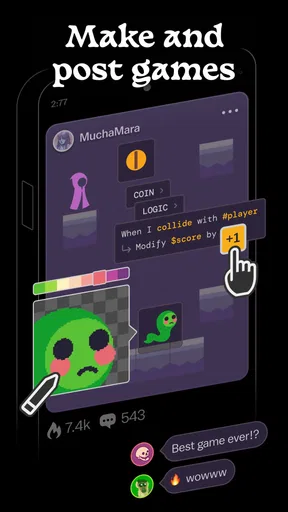
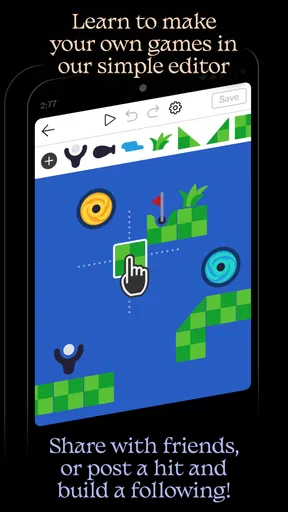
What's cool is that you don't need to have any background in coding. The app provides an intuitive interface that makes building your own games surprisingly easy. With a variety of templates and components at your disposal, you can drag, drop, and tweak to your heart's content. It's like being a kid in a candy store, but with pixels and polygons.
Exploration and Community
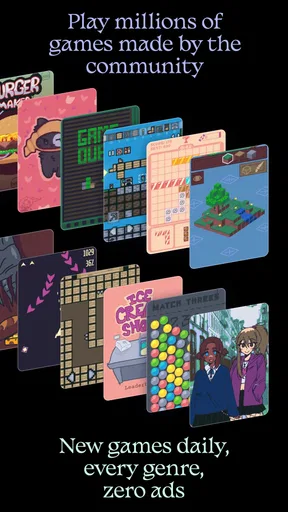
Beyond creating, exploration is where Castle truly shines. The app acts as a gateway to a massive collection of user-generated content. From quirky mini-games to elaborate story-driven adventures, there's something for everyone. And the best part? You're not just a passive consumer; you're part of a vibrant community.
Connecting with other creators is a breeze. You can follow other users, leave comments, and even collaborate on projects. It's a bit like social media for game developers, but way more fun. The community aspect fosters a sense of belonging and encourages you to keep experimenting and sharing your creations.
User Interface and Experience
Let's talk about the user interface. Navigating through Castle - Make and Play is a pleasant experience. The design is sleek, and the layout is user-friendly, making it easy to find what you're looking for. Whether you're creating or playing, the controls are intuitive, and the learning curve is gentle, which is perfect for both newbies and seasoned creators.
One feature that stands out is the app's performance. Despite the complex nature of some creations, the app runs smoothly without any noticeable lags. This ensures that your creative process is never interrupted, and your gaming experience remains enjoyable.
Challenges and Opportunities
While Castle - Make and Play offers a lot, there are a few challenges worth mentioning. As with any platform reliant on user-generated content, the quality can vary. You might stumble upon some less-polished games, but honestly, that's part of the charm. Each creation is a unique reflection of its creator's imagination.
Moreover, the app presents an opportunity for learning and growth. If you're into game development, it's a great starting point to hone your skills. The feedback from the community can be invaluable, pushing you to refine your designs and think outside the box.
Final Thoughts
So, what’s the verdict? Castle - Make and Play is a delightful sandbox for anyone with a creative itch to scratch. It's more than just an app; it's a community where imagination and play come together in perfect harmony. Whether you're there to build, explore, or connect with fellow creators, there's no shortage of fun to be had.
If you haven’t tried it yet, give it a whirl. You might just find yourself lost in a world of endless possibilities, one pixel at a time.
Pros
- User-friendly interface for easy creation.
- Vast library of assets for diverse designs.
- Engaging community for sharing creations.
- Regular updates with new features.
- Encourages creativity and problem-solving.
Cons
- Limited offline functionality.
- In-app purchases can add up.
- Occasional performance lag on older devices.
- Some features require a steep learning curve.
- Advertisements can be intrusive.
FAQs for Castle - Make and Play
What is Castle - Make and Play?
Castle - Make and Play is an innovative app that allows users to create and share their own games and interactive experiences. Designed for both creativity and fun, it provides a platform where users can explore a variety of user-generated content or dive into game creation themselves without needing complex coding skills.
Is Castle - Make and Play suitable for all ages?
Yes, Castle - Make and Play is designed to be accessible for users of all ages. Its intuitive interface makes it easy for children to navigate, while the depth of its creative tools can engage older users. However, parental guidance is recommended for younger children to ensure a safe and appropriate experience.
Do I need coding skills to create games in Castle?
No, coding skills are not required to create games in Castle. The app offers a user-friendly drag-and-drop interface that simplifies the game creation process. This allows users to focus on creativity and design, making it an excellent choice for beginners and those new to game development.
Can I share my creations with others?
Absolutely! Castle - Make and Play encourages community interaction by allowing users to share their creations with others. You can publish your games and let others play them, as well as explore and enjoy games made by the community. This feature fosters a vibrant and collaborative environment.
Is Castle - Make and Play free to use?
Castle - Make and Play is free to download and use, with optional in-app purchases. These purchases can enhance the experience by providing additional features or assets but are not necessary to enjoy the core functionalities of the app. Always check for any potential costs before downloading.


